

Used by 104 Schools, 12 Data Protection Service Providers, Multiple Local Authorities and Businesses
Use AI to Redact Documents and Videos in Minutes, Not Days.
100% secure, UK/EU-based AI redaction. Speed up your SAR redaction work with Acuity AutoRedact. Our context-aware AI automates redaction and audit reporting, while guaranteeing zero copies of your data are ever kept after processing.

Before using Acuity AutoRedact we used to happily spend weekends manually redacting documents, both for DSARS and general data sharing. The CCTV redaction has been an absolute revelation. One of the real advantages of working with Acuity is that we know they wont be resting on their laurels but will be developing the tool as the demands increase and change.
Ian Flood - GDPR Consultant
Global Governance, Risk & Compliance Experts

Before using Acuity AutoRedact we used to use multiple solutions such as Adobe. The benefits to us of using Acuity AutoRedact have been faster response times and easier training.
Colin Howard - Director
Fractional DPO Service
How Does Document Redaction Work?
Bulk Upload Your Documents and Deduplicate
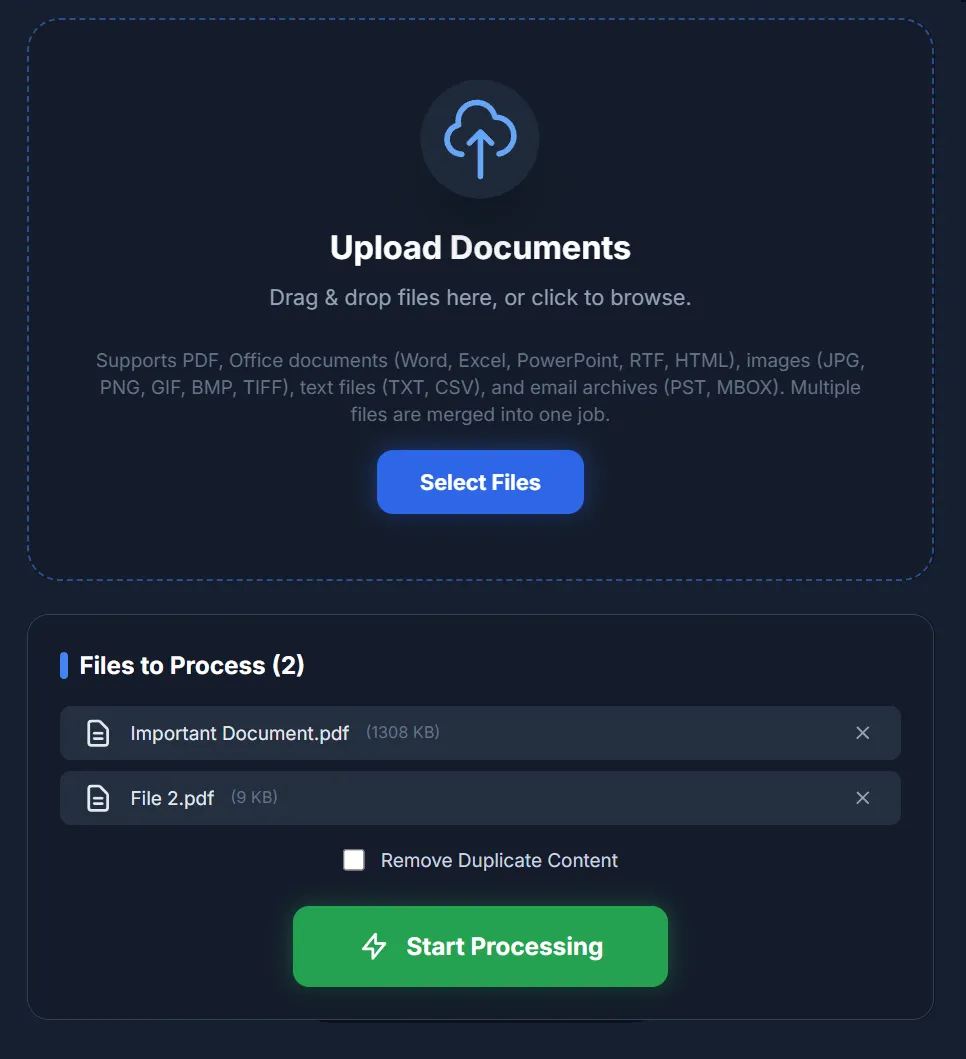
Begin your workflow by simply dragging and dropping your files into Acuity AutoRedact. Our robust ingestion engine supports a wide array of formats from standard PDFs and Office documents to images and email archives (PST and MBOX).
Before hitting 'Start Processing,' easily toggle the Remove Duplicate Content feature to streamline your dataset, saving you time and processing power right from the start.
Carry Out Your Redactions
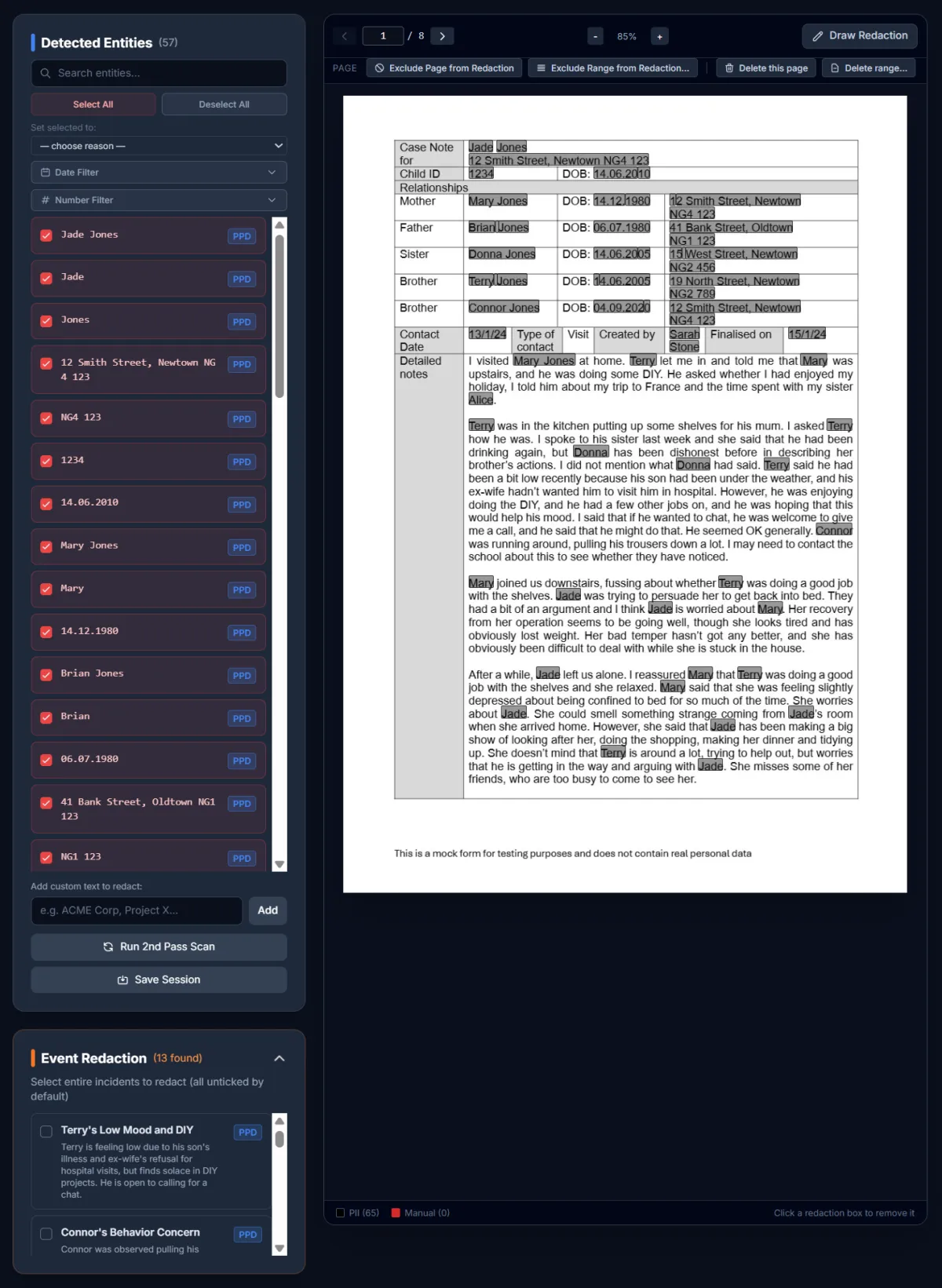
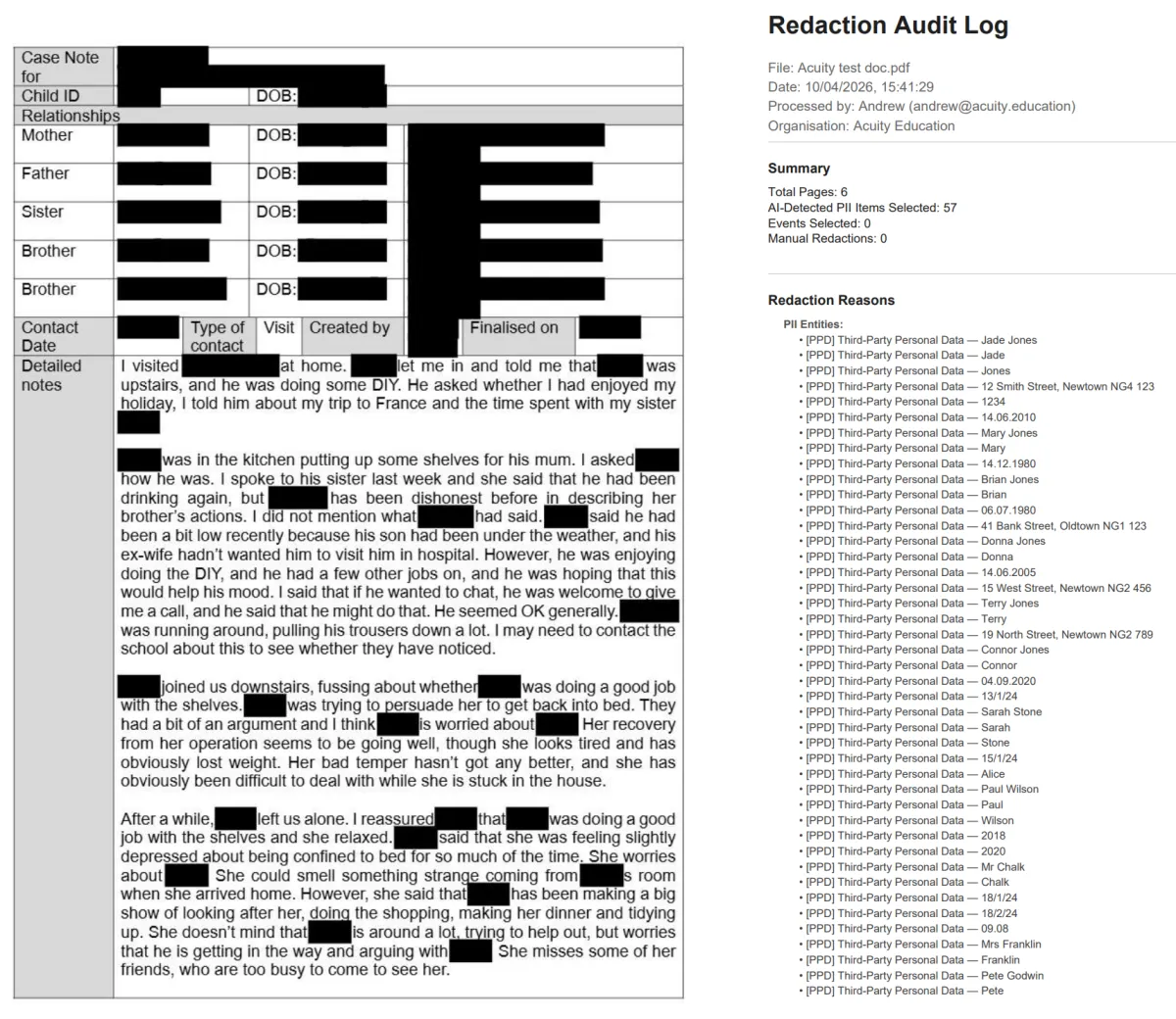
Step into the comprehensive review workspace. AcuityAutoRedact’s intelligent engine automatically flags Detected Entities - like names, dates, addresses, and ID numbers - highlighting them directly within the document preview for easy visual verification. You maintain complete control: easily toggle selections, add custom text to redact, or use the 'Draw Redaction' tool for manual overrides.
Go beyond simple keywords with our advanced Event Redaction, which understands context and allows you to redact entire sensitive incidents with a single click.
However, you are the expert in the driving seat and you have complete control over the process. AutoRedact's AI will make the job much easier and quicker but you are in control.
Download the Redacted Document and Audit Report
Complete your workflow by generating the securely redacted document alongside a comprehensive Redaction Audit Log.
Perfect for fulfilling Data Subject Access Requests (DSARs) or Freedom of Information (FOI) requests, the audit log ensures you maintain a transparent, defensible paper trail for total compliance and peace of mind.
How does Video Redaction Work?
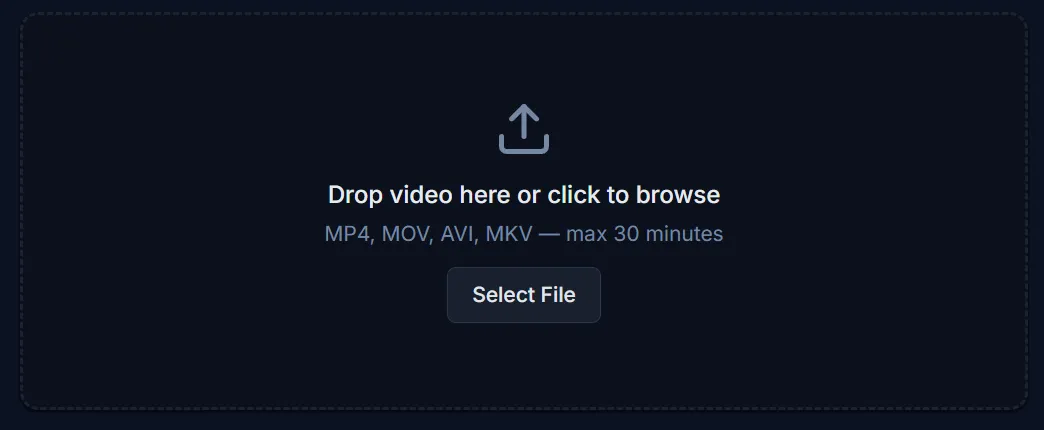
Upload Your Video
Upload a video in any of the major video file formats. AVI, MP4, MKV or MOV.
As soon as your video is uploaded our AI will begin scanning the video for unique people, vehicles and personally identifiable information.
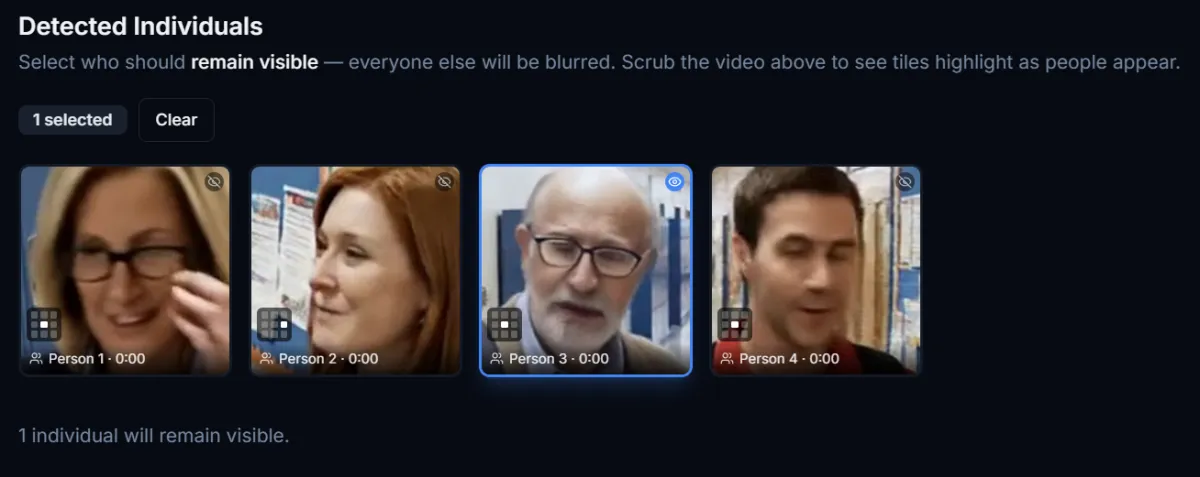
Select for Whitelisting
People and vehicles are identified throughout the video and each is represented by their own icon. Just click on the people and vehicles that you want to make visible and they will be included in the final video. Everyone else, and every other vehicle, will be fully redacted.
There is also a manual touch up tool so that you can quickly click and add any extra redactions that you judge to be appropriate.
However, no technical skills are needed, it is designed so that you click and AutoRedact does the work for you.

Download your Redacted Video
Then, once you are done, download your final video and everyone who you haven't selected will be redacted.
The video is fully redacted and you can save it to your computer and easily share it with your data subject or the body that requires the video footage.
Interactive Demos
If you want to see how Acuity AutoRedact works, we've prepared the below interactive demos for both the document redaction service and the video redaction service. This gives you an exact hands on experience of using Acuity AutoRedact.
Document Redaction
Video Redaction
Choose a Plan That Suits Your Needs
Free
No
Cost
200 Pages total usage
A perfect way to see how Acuity AutoRedact works
No video redaction
No credit card or billing data needed to register
Small
£370/
year + VAT
Up to 10,000 Pages Redacted Each Year
Up to 5 Videos Redacted Each Month. Video limit of 30 minutes per video.
Option to pay by invoice with immediate access
Unlimited Users - As many users as you wish can share the 10,000 pages
Recommended
Large
£870/
year + VAT
Up to 60,000 Pages Redacted Each Year
Up to 15 Videos Redacted Each Month. Video limit of 30 minutes per video.
Option to pay by invoice with immediate access
Unlimited Users - As many users as you wish can share the 60,000 pages
Enterprise
£2250/
year + VAT
Up to 500,000 Pages Redacted Each Year
Up to 30 Videos Redacted Each Month. Video limit of 30 minutes per video.
Option to pay by invoice with immediate access
Unlimited Users - As many users as you wish can share the 500,000 pages
Each package covers your entire organisation and you can assign as many users as you wish to your package.
You can also order by Purchase Order. If you would like to register us as a new supplier please contact [email protected] and we can provide all of the information you require. Purchase orders can also be sent to our accounts team at [email protected].
If you need higher usage allowances, please let us know your needs on [email protected] and we will send a custom quote.
A Message From Our Founder
Acuity AutoRedact uses cutting edge AI to automatically redact documents and videos to help you to process Subject Access Requests, and other necessary redactions, in minutes rather than days.
It follows your instructions, and gets to work redacting in the way that you need it to. It is easy to use and requires no technical skillset to begin using the service.
For years, I watched brilliant professionals spend countless, agonizing hours drawing black boxes over digital documents and video clips.
This product was built to save your time from having to do all that work by hand - and to save you countless hours each year.
Best wishes,
Andrew Walls
Founder - Acuity AutoRedact
FAQs
What file formats does Acuity AutoRedact support for document redaction?
Acuity AutoRedact supports a comprehensive range of file formats to streamline your workflow, allowing you to seamlessly merge multiple files into a single redaction job. For standard documents and data, it handles PDFs, Microsoft Office files (Word, Excel, and PowerPoint), and other text formats like RTF, HTML, TXT, and CSV. It also fully supports image scans (JPG, PNG, GIF, BMP, and TIFF) alongside email archive exports (PST and MBOX). Beyond these standard files, the software is equipped with AI-driven video redaction capabilities that can automatically blur identifying information like faces and license plates in CCTV footage, from MP4, AVI, MKV and MOV files making it a robust solution for GDPR compliance and Subject Access Requests.
Can Acuity AutoRedact handle large volumes of data for Large Organisations and Multi Academy Trusts?
Yes, Acuity AutoRedact is specifically architected to handle high-volume processing for Enterprise-scale organisations, Multi-Academy Trusts (MATs), Data Protection Agencies, Businesses, Local Authorities and other Public Sector organisations.
Because the platform is built on Google Cloud Enterprise Infrastructure, it does not rely on the limited processing power of your local office computers. Instead, it leverages "elastic cloud computing," meaning the system automatically scales up its resources to match your demand instantly.
Is Acuity AutoRedact compliant with GDPR?
We operate as a Data Processor on your behalf, providing a secure, compliant environment for you (the Data Controller) to process sensitive text and visual media. Our compliance is built on four pillars:
Data Sovereignty (UK & EU Only): We explicitly guarantee that no data is transferred to or processed in the United States. All processing, hosting, and computation occur strictly within the United Kingdom and the European Union, utilising the Enterprise Tier of Google Cloud to ensure your data remains within adequate jurisdictions.
Zero Retention (The 24-Hour Rule): We operate a strict "Process and Purge" policy. All uploaded files and redacted outputs are programmatically destroyed immediately upon session completion and never retained for longer than 24 hours. This minimizes data liability and ensures we do not hold historical records of your sensitive information.
Zero Model Training: Your data is processed in isolated containers. We utilize Enterprise API agreements which legally and technically prevent your documents or video footage from being used to train Google’s or Acuity’s Artificial Intelligence models.
Security by Design: All data is encrypted at rest (AES-256) and in transit (TLS 1.3). We utilize hashed credentials and Multi-Factor Authentication (MFA) to prevent unauthorized access.
How secure is the data processed through Acuity AutoRedact?
Acuity AutoRedact employs Tier 1 enterprise-grade security architecture to ensure your data is protected at every stage of the lifecycle. Built on the Google Cloud Enterprise infrastructure, all processing occurs strictly within the UK and EU, guaranteeing data sovereignty and full GDPR compliance. Your files are protected by AES-256 encryption at rest and TLS 1.3 encryption during transit, ensuring that sensitive information—whether text or CCTV footage—remains inaccessible to unauthorized parties. Crucially, we operate a "Process and Purge" policy where data is isolated during analysis, never used to train AI models, and automatically permanently destroyed within 24 hours of upload, ensuring we never retain historical copies of your sensitive records.
What training or support does Acuity AutoRedact provide for new users?
We offer training to every new customer and have a bank of comprehensive training videos to learn how to operate the platform. It is a priority to ensure that all users fully understand how to use Acuity AutoRedact and to get the best value from their subscriptions.
Can I integrate Acuity AutoRedact with other enterprise systems?
Acuity AutoRedact is designed to be "system agnostic," meaning it integrates seamlessly with your existing infrastructure without the need for complex plugins. Since virtually all major document types work with Acuity AutoRedact, our platform is instantly compatible with 100% of your current software for document processing. Similarly, our video ingestion engine supports a wide variety of standard formats (such as MP4, MKV, MOV, and AVI), ensuring that footage exported from diverse systems can be uploaded, processed, and sanitized immediately.
Contact Us
If you have a question, comment or want to get in touch - then we would love to hear from you.
Please fill in the form below and we will respond as soon as possible.
At Acuity AutoRedact, our mission is to empower organisations with precise, automated redaction technology, safeguarding sensitive data and ensuring regulatory compliance while maintaining seamless operational efficiency and complete document integrity.
Quick Links
Contact Us
Legal
© Acuity AI Education Ltd 2026 All Rights Reserved.